
Why Developers Are Switching to BaaS in 2026
Introduction
Imagine you want to build a mobile app. You have a great idea, maybe a to-do app, a chat app.
Then reality hits – You need a server. A database. A login system. File storage. Security rules. Deployment pipelines. Scaling logic.
That is a lot of work before you even write a single line of your actual app.
This is the problem Backend as a Service (BaaS) solves. It hands you a ready-made backend so you can focus on building the product people actually use.
In this guide, you can get clear thinking about BaaS — what it is, why it exists, how it works, and when (and when not) to use it.
What is BaaS?
Backend as a Service (BaaS) is a cloud-based model where a third-party provider gives you pre-built backend infrastructure through APIs and SDKs.
Instead of building and managing your own server, database, authentication system, and storage, you connect your app to a BaaS platform that provides all of that out of the box.
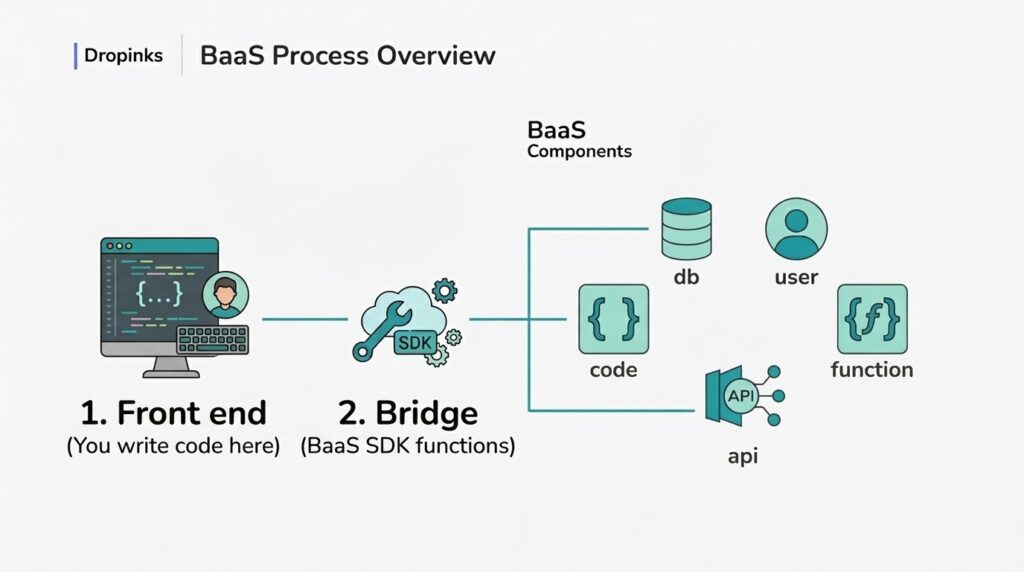
Simply: BaaS is a separate layer to provide the backend functionalities.
Popular BaaS platforms include:
Why Does BaaS Matter?
Building a backend from scratch is expensive, time-consuming, and requires deep technical knowledge. You need to:
- Set up and maintain servers
- Write database schemas and queries
- Build authentication from scratch
- Handle security and data protection
- Manage scaling as your user base grows
- Monitor and fix infrastructure issues
For a startup, solo developer, or small team, this overhead can kill a product before it ever launches.
BaaS matters because it:
- Dramatically reduces development time (days instead of weeks)
- Lowers cost — no backend engineers needed for basic apps
- Lets non-backend developers (or no-coders) build complete apps
- Provides enterprise-grade infrastructure from day one
- Scales automatically without manual intervention
Where is BaaS Used?
BaaS fits a wide range of real-world scenarios:
Startups and MVPs A founder wants to validate an idea quickly. BaaS lets them launch a working product in days without hiring a backend team.
Mobile apps Apps like chat applications, social platforms, and fitness trackers use BaaS for real-time data sync, push notifications, and user authentication.
Internal tools Companies build internal dashboards, admin panels, and employee portals using BaaS without dedicating engineering resources.
Prototypes and side projects Developers use BaaS to test new ideas fast without setting up full infrastructure.
E-commerce and marketplaces Small online stores use BaaS for product databases, user accounts, and file storage (product images).
How Does BaaS Work?
Here is what happens step by step when you build an app on a BaaS platform.
Step 1 — You build the frontend You write the user interface: screens, buttons, forms. This could be a React web app, a Flutter mobile app, or even a no-code UI builder.
Step 2 — You connect to the BaaS platform You install the BaaS SDK (a code library) or call its REST API. This is usually just a few lines of configuration — you paste in your project credentials and you are connected.
Step 3 — You use the BaaS services directly
This is where it gets powerful. Instead of building these yourself, you just call them:
- Authentication – auth.signIn(email, password) — the BaaS handles password hashing, session tokens, and security
- Database —
db.collection('posts').add({ title: 'Hello' })— the BaaS stores, retrieves, and syncs data - File storage —
storage.upload(file)— files are stored in the cloud with automatic CDN delivery - Serverless functions — custom code that runs in the cloud for logic your frontend should not handle
Step 4 — BaaS handles the infrastructure Servers, databases, scaling, backups, security patching — all of this happens invisibly. You never SSH into a machine. You never configure a load balancer.
Step 5 — Your app goes live Your frontend is deployed (Vercel, Netlify, or an app store), and the BaaS provider keeps the backend running 24/7.
When Should You Use BaaS?
Use BaaS when:
- You are building an MVP or prototype and need to move fast
- Your team has strong frontend skills but limited backend expertise
- Your app needs standard features — login, database, file uploads — without custom logic
- You want to reduce infrastructure costs and operational burden
- You are a solo founder or small startup validating an idea
Avoid BaaS (or use it carefully) when:
- You need complex, custom business logic that does not fit the BaaS model
- You have strict data residency or compliance requirements (healthcare, finance)
- Your app will reach very high scale and BaaS pricing becomes costly compared to managed infrastructure
- You need full control over your database schema, indexing, and query performance
- Vendor lock-in is a serious risk for your business (what happens if Firebase changes its pricing?)
Pros of BaaS
Advantages
- Speed — Build and launch significantly faster than traditional development
- Lower cost upfront — No need for backend engineers early in the project
- Built-in scalability — The platform scales automatically as traffic grows
- Security defaults — Authentication, HTTPS, and data rules are handled by the provider
- Real-time capabilities — Most BaaS platforms offer live data sync out of the box
- Generous free tiers — Firebase, Supabase, and others offer free plans suitable for small projects
Limitations
- Vendor lock-in — Migrating away from Firebase is painful; your data and logic are tightly coupled to their platform
- Limited customization — You work within the boundaries the BaaS provider defines
- Cost at scale — Free tiers are generous, but costs can rise sharply with millions of users
- Performance limits — For high-performance, complex queries, a dedicated database setup may outperform BaaS abstractions
- Less control — You cannot fine-tune the server, tweak database internals, or modify system-level behavior
Next Post: Real Example: Building a Login System with BaaS