
BaaS Authentication
Introduction
In our last post, we covered why developers are switching to BaaS — today, let’s zoom into one of its most powerful features: authentication.
Imagine you’re building an app. You have a great idea, a solid frontend, and users ready to sign up. Then you need a secured login system.
Passwords. Hashing. Tokens. Sessions. Email verification. Suddenly what seemed like a weekend project feels like a security engineering course.
This is exactly the problem BaaS authentication solves. It hands you a login system – so you can focus on building your product, not reinventing security layer.
What Is BaaS Authentication?
BaaS (Backend as a Service) platforms like Firebase, Supabase, and Appwrite come with a built-in authentication system — ready to use the moment you connect your app.
Think of it as hiring a professional security firm instead of training your own guards from scratch. You define the rules; they handle the execution.
When users log in to your app, a lot happens invisibly:
- Their password is never stored as plain text — it’s hashed
- Their identity is verified against a managed user database
- A token is issued that proves who they are
- That token travels with every future request to protect private data
BaaS handles all of this. You just call a function.
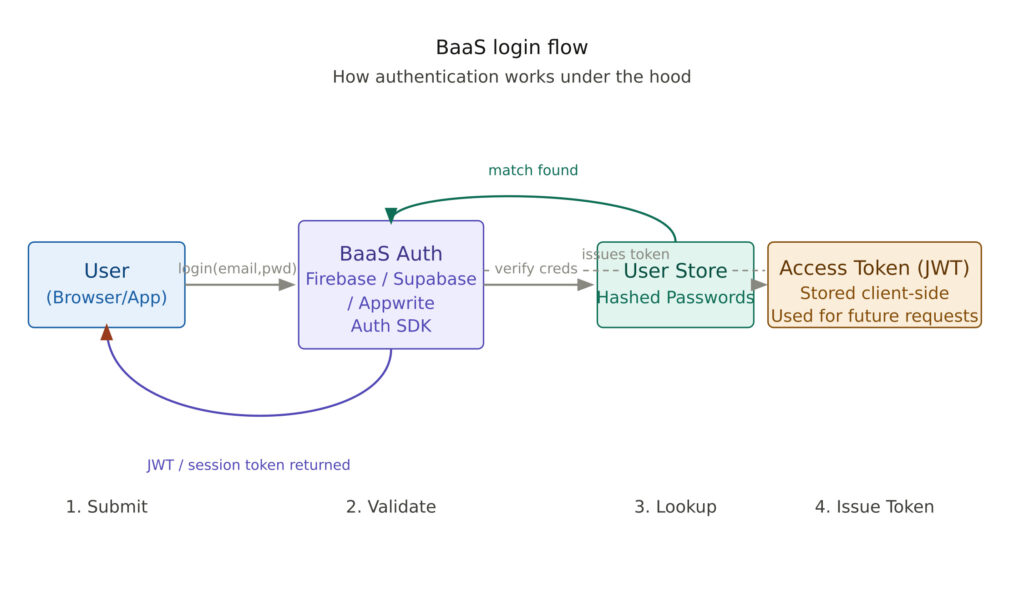
References: Supabase Auth | Clerk Auth | Auth0
Why Does It Matter?
Authentication is one of the most security-critical parts of any application. Getting it wrong can expose user data, invite attackers, and destroy user trust overnight.
Building auth from scratch actually requires:
- Secure password hashing (bcrypt, Argon2)
- Token generation and validation (JWT, OAuth)
- Session management
- Rate limiting to prevent brute-force attacks
- Email verification and password reset flows
- Multi-factor authentication (MFA) support
That’s months of engineering.
BaaS handles all of this, maintained by teams of security engineers, updated continuously, and battle-tested across millions of apps.
The value is simple: speed, security, and peace of mind.
Where Is BaaS Auth Used?
BaaS authentication powers more apps than you might think:
- Startups building MVPs — working login in hours, not weeks
- SaaS products — user accounts, role-based access, team permissions
- Mobile apps — iOS and Android with social login (Google, Apple)
- Internal tools — employee portals using company SSO
Any app that has users needs authentication. BaaS makes it production-ready from day one.
When Should You Use BaaS Auth?
Use BaaS auth when:
- You’re building an MVP or early-stage product
- Your team doesn’t have dedicated security engineers
- You need social login (Google, Apple, GitHub)
- You want email verification, password reset, and MFA without building them
- Time to market is a priority
Consider building your own when:
- You have strict compliance requirements (HIPAA, FedRAMP, custom SSO)
- You need deep customization of the token lifecycle
- You’re operating at massive scale with unique session management needs
- You’re migrating from an existing identity system with complex rules
- Your organization requires full data sovereignty with zero external dependencies
The honest answer for 90% of projects: use BaaS auth. The edge cases where you need custom auth are real — but rare.
Pros and Cons
Advantages
- Fast setup — working login in under an hour
- Security by default — password hashing, token signing, brute-force protection all handled
- Multiple auth methods — email, social, magic links, phone OTP, SSO
- Maintained for you — security patches and updates applied automatically
- SDKs for every platform — web, iOS, Android, Flutter, React Native
Limitations
- Vendor dependency — your auth data lives on their platform
- Customization ceiling — very specific token behavior may not be possible
- Cost at scale — pricing tiers increase significantly with millions of users
- Migration complexity — moving off a BaaS auth system later can be painful
- Internet dependency — self-hosting requires more setup (except Appwrite/Supabase)
Conclusion
BaaS authentication removes one of the hardest, most security-sensitive problems in app development and turns it into a few lines of code.
You get secure password storage, token-based sessions, social login, email verification — all maintained by experts — without writing a single line of cryptography.
The deeper question isn’t can you use BaaS auth — you clearly can. The more interesting question is: at what scale, and with what compliance requirements, does it make sense to graduate to a dedicated identity platform?
That’s not a day-one problem. That’s a good problem to have.
Next post: How BaaS Authentication Works