
How BaaS Authentication Works: Step-by-Step Implementation
Introduction
In our previous post, we covered what BaaS authentication is and when to use it — now let’s get into the actual implementation.
Knowing that BaaS handles your login is one thing. Understanding how it works — and being able to build it yourself — is what separates someone who uses a tool from someone who truly understands it.
In this post you’ll see exactly what happens when a user logs in, a step-by-step walkthrough of the auth flow, and working code examples across three real BaaS platforms.
How a BaaS Login System Works
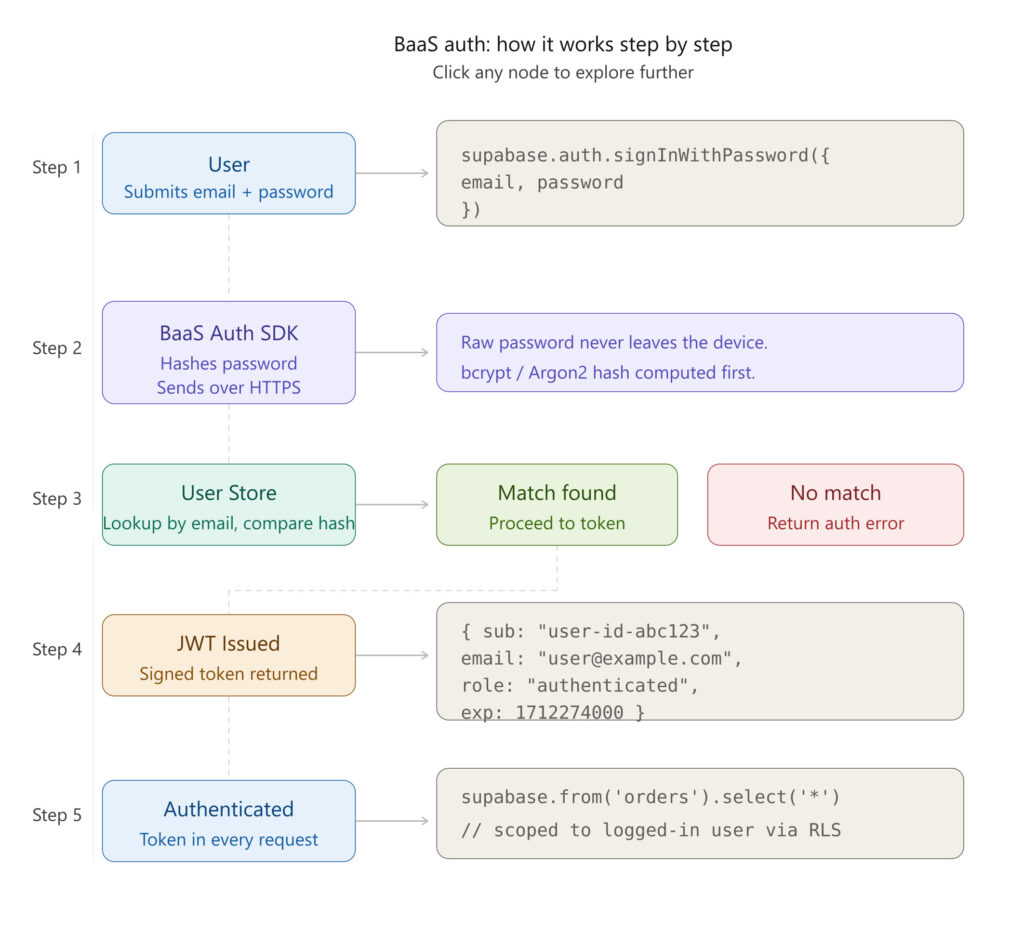
Step 1 — User submits credentials
The user types their email and password into your login form. Your frontend captures this and passes it to the BaaS SDK.
// Supabase example
const { data, error } = await supabase.auth.signInWithPassword({
  email: '[email protected]',
  password: 'securepassword123'
})
Step 2 — BaaS Auth validates the request
Your BaaS SDK sends the credentials securely over HTTPS to the authentication service. The platform then:
- Looks up the user by email
- Hashes the submitted password
- Compares it to the stored hash
Your app never sees or stores the raw password.
Step 3 — User store lookup
Behind the scenes, the BaaS platform queries its managed user database — storing hashed passwords, metadata, and account status. You never touch this database directly.
Step 4 — Token issued
If the credentials match, the BaaS platform issues a JWT (JSON Web Token) — a cryptographically signed token proving the user’s identity.
{
  "sub": "user-id-abc123",
  "email": "[email protected]",
  "role": "authenticated",
  "exp": 1712274000
}
This token is returned to your frontend and stored in memory or a secure cookie.
Step 5 — Authenticated requests
Every subsequent API call includes this token automatically. Your BaaS database rules read the token and grant or deny access to data.
// Supabase automatically scopes data to the logged-in user
const { data } = await supabase.from('orders').select('*')
Building Login with Real BaaS Platforms
Firebase Authentication
Best for: React Native, Flutter, Android, iOS; Google ecosystem
import { signInWithEmailAndPassword } from "firebase/auth";

const login = async (email, password) => {
  try {
    const userCredential = await signInWithEmailAndPassword(auth, email, password);
    console.log("Logged in:", userCredential.user.email);
  } catch (error) {
    console.error("Login failed:", error.message);
  }
};
Firebase also offers Google Sign-In, Apple Sign-In, and phone OTP — all in a few extra lines.
Supabase Auth
Best for: PostgreSQL lovers, open-source projects, self-hosting
const { data, error } = await supabase.auth.signInWithPassword({
  email: '[email protected]',
  password: 'password'
})

if (error) console.error(error)
else console.log('Session:', data.session)
Supabase stores user data in real PostgreSQL. Row-Level Security (RLS) policies automatically scope data to the logged-in user — no backend middleware needed.
Appwrite Auth
Best for: Self-hosted BaaS, privacy-first projects, Docker deployments
import { Client, Account } from "appwrite";

const client = new Client()
  .setEndpoint('https://cloud.appwrite.io/v1')
  .setProject('[PROJECT_ID]');

const account = new Account(client);

const session = await account.createEmailPasswordSession(
  '[email protected]',
  'password'
);
Beginner to Thinking Phase: Deeper Questions
Once your login works, the real architectural questions begin.
“What happens at 1 million users?” Firebase, Supabase, and Appwrite all scale horizontally — but pricing scales too. At large MAU counts, many teams migrate to dedicated identity providers like Auth0, Clerk, or self-hosted Keycloak.
“Would this scale globally?” Firebase uses Google’s global infrastructure. Supabase lets you choose your region. Appwrite can be self-hosted anywhere. For global apps, auth server location directly affects login latency.
“How do I handle roles and permissions?” BaaS auth handles identity (who you are) but not always authorization (what you can do). You’ll typically add a roles column to your user table and enforce it via database rules or middleware. Supabase RLS is excellent for this.
“What if the BaaS goes down?” JWTs are stateless — once issued, they’re verified locally without hitting the auth server again until they expire. A brief auth outage won’t immediately break logged-in users, but new logins will fail.
“How do I migrate users later?” Most BaaS platforms let you export hashed passwords. But hash algorithms differ across platforms — migration often requires a “re-hash on next login” strategy, where users get silently re-hashed during their next sign-in.
Conclusion
Building a login system used to mean weeks of security engineering. BaaS authentication collapses all of that into a few SDK calls.
Whether you choose Firebase, Supabase, or Appwrite, the fundamentals are the same — secure password storage, JWT sessions, social login, and a system maintained by security experts.
Now that you understand both the concept and the implementation, you’re ready to ship authentication with confidence — not just copy-paste it.